


How to Set Up IPTV on Fire Stick
At its core, the Fire Stick is an Android device. Theoretically, any app compatible with Android devices can be installed on a Fire Stick; the only difference lies in the specific installation method.
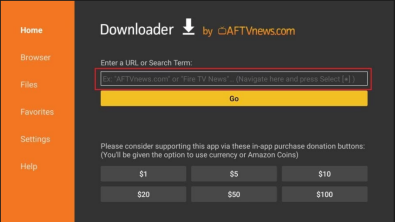
Typically, you begin by downloading the "Downloader" APK. Once installed, you simply enter a specific short code within the Downloader app to automatically download and install the desired application. Each individual app has its own unique short code.
(For example: Refer to the short code—or "Shortenter code"—listed in Step 1 below: 6-Digit Code: 178377.)
Usage Steps:
6-Digit Code: 178377
First, install the Downloader app.
Next, assign the download URL to a 6-digit code.
Enter these 6 digits into the Downloader app to automatically download the player APK.
You can also enter the download link URL directly, without using the assigned code.
Using this method, you can download any APK to your Fire Stick.